Appearance
🌅 My Dashboard
Your Dashboard is the central command center for your recovery journey. It aggregates data from across the app to give you a real-time snapshot of your health.
1. The Identity & Momentum Card
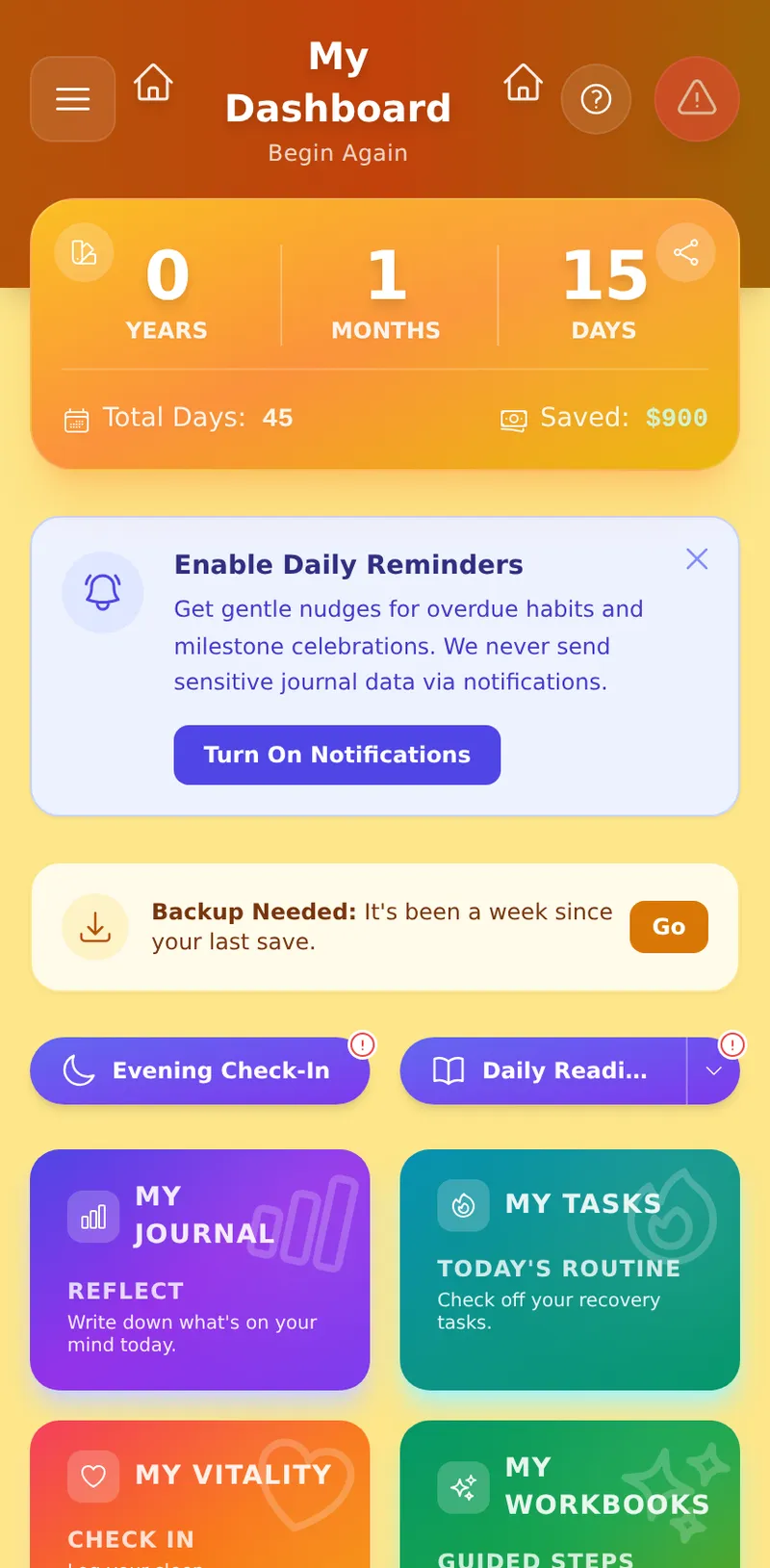
At the very top of your dashboard is your unified Identity Card.
- Clean Time: Tracks your exact sobriety time in Years, Months, and Days.
- Gamification Rank: Right below your time, you will see your current Level, Archetype (e.g., Scholar, Doer, Monk), and your XP Progress Bar.
- Financial Freedom: If configured, the bottom right will show exactly how much money you have saved since your sobriety date.
💡 Pro Tip: You can configure your daily, weekly, or monthly substance cost in Profile → General to activate the Financial Freedom tracker.
- Hero Color: Tap the swatch icon in the top-left corner of the card to pick from 5 color themes (Amber, Sky, Emerald, Violet, Rose). Your choice is saved instantly, applies to any milestone image you share, and now also sets the color of your Dashboard's header bar and background — so your whole Dashboard reflects the theme you picked, not just the hero card.
💡 Pro Tip: You can also change this permanently from Profile → General → Hero Appearance.
2. Crisis Tools (Urge Surfer & SOS)
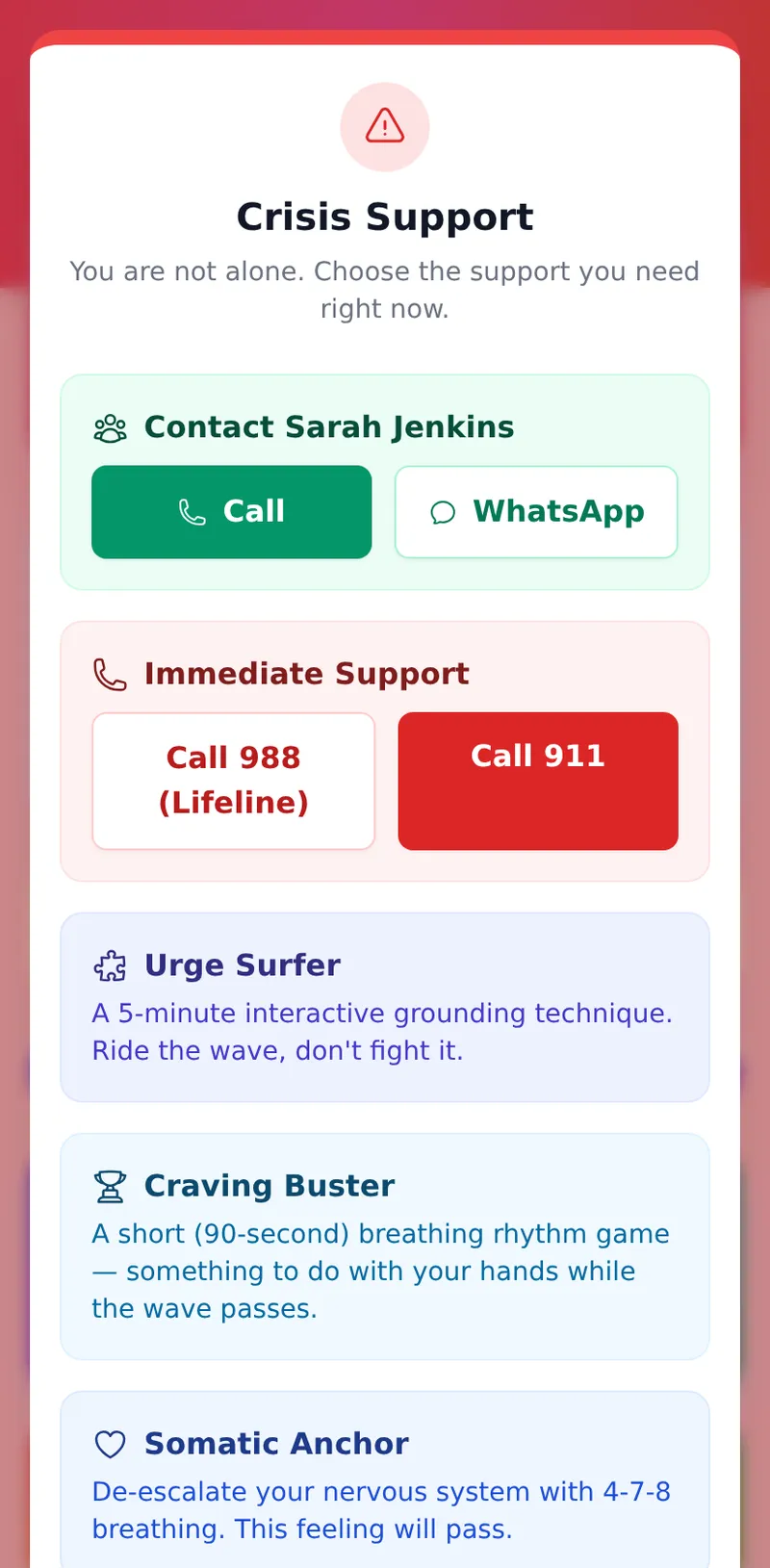
If you are experiencing a craving or a panic attack, tap the red Warning Triangle (SOS) in the top right corner of the dashboard header.
3. The Dynamic Anchor
Below the Identity Card you'll find a two-button Quick Action Bar — your daily touchpoints.
Morning / Afternoon / Evening / Night Check-In
The left button adapts its label and pre-filled prompt to the current time of day:
| Time Window | Label | Prompt Focus |
|---|---|---|
| 5 am – 12 pm | Morning Check-In | Today's intention, gratitude, potential trigger |
| 12 pm – 5 pm | Afternoon Check-In | Energy level, a small win, staying grounded |
| 5 pm – 10 pm | Evening Check-In | Best part of the day, a challenge, wind-down plan |
| 10 pm – 5 am | Night Check-In | Grounding, safety, releasing the day |
Tapping the button opens a full-screen journal editor pre-loaded with that prompt. The entry is Zero-Knowledge encrypted before it leaves your device. A red dot badge appears on the button if you haven't checked in today.
Vault note: If your Vault is locked, a small padlock icon appears on the button. You'll be prompted to enter your PIN before the editor opens.
Daily Reading
The right button opens today's reading in-app (see the Daily Readings guide for details). Tap the ▾ chevron beside it to browse external fellowship readings (AA, NA, SMART, etc.) in your browser instead.
A red dot badge appears on the button if you haven't read today.
4. Push Notifications (The Beacon)
Staying on track is easier with gentle nudges. At the top of your Dashboard, you may see a banner asking you to "Enable Daily Reminders".
- Milestone Celebrations: Get notified the moment you hit a new recovery milestone.
- Habit Nudges: Receive a quiet reminder if you have pending habits or tasks left to complete for the day.
- Note for iOS (iPhone) users: Apple requires you to install the app to your Home Screen before it allows push notifications. Follow the installation guide if you don't see the banner.
Managing Dashboard Badges
Go to Profile → General, scroll to the Anchor Notifications section to control the red dot badges on your Dynamic Anchor:
- Daily Check-In Badge — shows a red dot on the check-in button when you haven't checked in today.
- Daily Reading Badge — shows a red dot on the reading button when you haven't read today.
- Daily Intent Badge — shows a red dot when you haven't set today's intention.
Each badge can be toggled on or off independently. These control the visual indicators on the Dashboard — they are separate from the push notifications sent by The Beacon.
5. Smart Data Alerts & Changelog
- Backup Needed: Because your data is encrypted with Zero-Knowledge architecture, we cannot recover it for you. If it has been more than 7 days since your last export, the Dashboard will politely remind you to download a backup. (Note: If you have Google Drive Auto-Sync enabled in your Profile, this warning is hidden as the app handles it for you).
- Changelog Beacon: When we release a new feature or bug fix, a small banner will appear at the top of your dashboard to let you know what's new.
6. The Bento Grid
Quickly view your active streaks and completion rates across your core pillars:
- Journal: View your consecutive day streak and weekly consistency.
- Habits: View your overall completion rate and "Fire" score (the combined sum of all your active habit streaks).
- Vitality: View your biological regulation streak and total logs.
- Wisdom: See how many questions you've answered out of the total available across all workbooks, with your overall completion percentage shown just below.
- Games: Zero-knowledge, anti-shame mini-games and psychoeducation quizzes — see the My Recovery Games guide for the full list.
- Tools: Access CBT exercises and grounding tools.
7. The Gamification Engine
Recovery is a high-performance lifestyle. MRT tracks your positive actions and assigns you an Archetype and Level.
- Earning XP: You earn XP by writing journals (+25 XP), completing tasks (+10 to +50 XP), logging vitality metrics, and completing your monthly Recovery Capital check-in (+25 XP).
- Archetypes: Depending on where you spend your time, the system will assign you a persona: Scholar (Workbooks), Doer (Tasks), Monk (Vitality), or Philosopher (Journaling).